Monday Q&A | Multiple Compost Bins, Web Hosting, & Coupon Organization
Being rather new to "kitchen scrap" composting, I was wondering if you could enlighten us as to how you harvest your finished compost. I've used quite a bit of mine and still have about ¼ of it left. Did you start a completely new one or did you use up all of the finished compost before starting another. And if so, did you not compost scraps while waiting to use up the finished compost?\
-Marianna
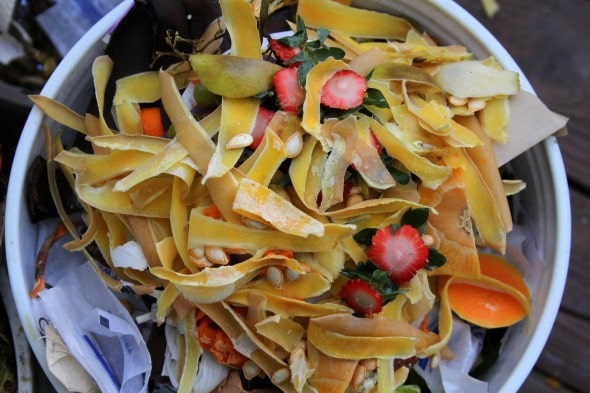
Oh, good question! I usually have two compost bins going...one that's filled up and is just being left to, well, compost, and then another one to which I'm actively adding greens and browns.
I do this mainly because I figure that if I keep adding fresh compost to a bin, I'll never have a bin that's full of ready-to-use compost. So, I just keep adding and adding to one bin until it's full, and then I start the next one.
I don't know how things are in other climates (compost is probably slower in colder climates and faster in warmer climates), but here, it usually works out that I fill up one bin every six months or so. It never ceases to astound me that six months worth of produce scraps can fit into a single Rubbermaid bin, but they can! It's almost magical the way they shrink. I haul bucket after bucket after bucket out there, and somehow, it all keeps fitting for months on end.
By the way, any of you that are new to this whole composting thing might find the posts in the Composting category to be helpful.
My question is: What are your frugal tips for finding web hosting? I have always been with godaddy, but I am working on merging some of our family blogs and I will need a new hosting account. I was just curious if you have found a more frugal way to host a site.
-Kristin
The Frugal Girl is hosted on Agathon, which is by FAR the very best hosting service I've had in 10 years of blogging.
SERIOUSLY FABULOUS.
The customer service is amazing, the care they take to make sure my site is running well is like nothing I have ever had before.

Agathon's hosting starts at $35/month, which might be a little steep for you if you're just starting out.
So for newbies, I'd recommend that you go with Bluehost. They're inexpensive, super easy to use, have responsive customer service, and they're perfect for a new blog.
Basically, to get started, you'll sign up with Bluehost, install WordPress on your site, and then you'll be in business.
You might want to browse through my posts about blogging if you want to read some of my thoughts and tips on the topic.
How do you organize your coupons? By name? By expiration date?
-Rachel
I don't have tons of coupons in my coupon box (I used to have a lot more back when stores around here doubled $1 coupons!), but because I'm not entirely anti-coupon, I do always have some in my box. I organize them by category...I have a Dental category, a Baking category, a Cereal category, and so on.
Every now and then I go through my box and take out all the expired coupons, category by category. If I had oodles of coupons, this probably wouldn't work too well, but this simple system works for me.
________________________________
Readers, as always, please feel free to add your advice to mine!



Thanks for the information on the hosting site. I am new to all of this and love it.
I have joined you as a follower.
Please stop by and visit my site The Recycled Dove. Any comments and joining as a follower would be greatly appreciated.
Dove
I just stick all of my coupons in an envelope that I keep in my purse. I try to keep like coupons together. I'm like Kristen, though, I don't use a ton of them. I can't believe there was a store that doubled $1 coupons! That's great! One time Food lion ran a special where they would triple any coupon up to $.99.
I've been with Bluehost for years and have had no problems with them. I've only once had to contact their customer support but that was a billing issue - I needed to update an expired credit card. My husband uses them too.
I've been reading about compost. Alot of people saying that the bins arn't necesarry but i am worried about vermin. and I guess people seeing a big pile of rotting garbage in my yard. How long doing it take for you to A) fill a bin up and B) for it to compost?
Ben, you don't need a bin but they have a number of benefits. Bins keep your stuff in a more compact lump so it composts a bit faster, it's neater and nicer looking, and easier to shovel stuff out of.
To avoid vermin, don't add protein. Now nothing's perfect - any sort of foodstuff will attract some critters but meat/cheese/eggs are the most attractive. (Egg shells and beans don't attract much vermin.)
How fast you fill a bin depends on how much trash you generate and the size of the bin. I have a small household but love to eat melon and to cook. I guess I generate on average a quart of food trash per day in the summer and less in the winter (no melon or corn). I've never filled up my 18 gal bin all at once. My pile is a "cold" pile (meaning the density of decomposing items never gets great enough to cause the pile to heat up from the decomposition) so I give my pile 6-12 months to decompose before using it.
I use two bins. One is "active", i.e., for tossing kitchen trash layered with an equal amount of shredded paper and leaves. The other is "finishing," once or twice a year I shovel the contents of the active bin into the finishing bin, and let it sit till the next time I spread compost in my yard. The advantage of shoveling is that the partially-composted stuff gets mixed up, which speeds up the process. Another advantage for me is that my pile usually gets too wet, I can add more browns as I move the stuff to the finishing bin.
Good luck. It's awfully satisfying to turn trash into black gold.
I was just discussing server issues with my brother, the IT dude. He also recommended Bluehost.